Home » Posts filed under red
| Name: | Box Office |
|
| Platform: | Blogger / Blogspot |
|
| Coder/Designer: | Avinas Bhardwaj, Web 2 Feel |
|
| Coder/Designer URL: | http://besttheme.net/ , http://www.web2feel.com/ |
|
|
| Description: | Box Office is a free Blogger template that is an adaptation of the Wordpress. |
| This is a movie review template which is intent for use in any review like movie, video, book, software etc. This theme have a nice rating bar which will represent the rating given by author. |
|
| Theme Features: | - |
| |
|
| Instructions: | - |
| |
|
| Compatible: |      |
|
| Tags: | 1 Sidebar, 2 Column, 4 Column, Adapted from Wordpress, Blogger, brown, Fixed Width, Gallery, Pink, red, Right Sidebar, White |

| Name: | Inspect |
|
| Platform: | Blogger / Blogspot |
|
| Coder/Designer: | Lasantha Bandara / New WP Themes |
|
| Coder/Designer URL: | http://www.premiumbloggertemplates.com/ , http://newwpthemes.com/ |
|
| Description: | Inspect is a free Blogger template that is an adaptation of the Wordpress, |
| it's a elegant magazine style with 1 sidebar, 2 column layout, blue and red color background, featured section, fixed width, header banner ads ready, right sidebar, slider, Twitter ready, top navigation bar and Web 2.0. |
|
| Theme Features: | - |
| |
|
| Instructions: | Configure Featured Content Slider: |
| Login to your blogger dashboard--> layout- -> Edit HTML. Find <!-- Featured Content Slider Started -->. Now scroll down slowly and you can see each featured slider codes between <div class='imageElement'> and </div>.
Now replace,
"This is featured post X title" with your featured post title.
"SLIDER-X-URL-HERE" with your featured post URL.
Slider description with your slider description. Slider image address with your slider image. For each featured slider.
Add a Header Logo:
You can add a header logo for this template easily in the "Page Elements" section (Blogger Default Method). Logo image size must be 239px width and 92px height. |
|
| Compatible: | |
|
| Tags: | 1 Sidebar, 2 Column, Adapted from Wordpress, Ads Ready, Blue, Blogger, dark, Elegant, Featured Section, Fixed Width, Magazine, red, Right Sidebar, Slider, Social Bookmark, Twitter Ready, Web 2.0, Widget Ready |

| Name: | iFashion |
|
| Platform: | Blogger / Blogspot |
|
| Coder/Designer: | Lasantha Bandara / New WP Themes |
|
| Coder/Designer URL: | http://www.premiumbloggertemplates.com/ , http://newwpthemes.com/ |
|
| Description: | iFashion is a free Blogger template that is an adaptation of the Wordpress, |
| it's a magazine style with 1 sidebar, 2 column layout, red and white color background, featured section, fixed width, header banner ads ready, right sidebar, slider, Twitter ready, top navigation bar and Web 2.0. |
|
| Theme Features: | - |
| |
|
| Instructions: | Configure Featured Content Slider: |
| Login to your blogger dashboard--> layout- -> Edit HTML. Find <!-- Featured Content Slider Started -->. Now scroll down slowly and you can see each featured slider codes between <div class='imageElement'> and </div>.
Now replace,
"This is featured post X title" with your featured post title.
"SLIDER-X-URL-HERE" with your featured post URL.
Slider description with your slider description. Slider image address with your slider image. For each featured slider.
Add a Header Logo:
You can add a header logo for this template easily in the "Page Elements" section (Blogger Default Method). Logo image size must be 249px width and 82px height. |
|
| Compatible: | |
|
| Tags: | 1 Sidebar, 2 Column, Adapted from Wordpress, Ads Ready, Blogger, Featured Section, Fixed Width, Magazine, red, Right Sidebar, Slider, Social Bookmark, Twitter Ready, Web 2.0, White, Widget Ready |

| Name: | Vias |
|
| Platform: | Blogger / Blogspot |
|
| Coder/Designer: | Lasantha Bandara / New WP Themes |
|
| Coder/Designer URL: | http://www.premiumbloggertemplates.com/ , http://newwpthemes.com/ |
|
| Description: | Vias is a free Blogger template that is an adaptation of the Wordpress, |
| it's a magazine style with 2 sidebar, 3 column layout, red and white color background, featured section, fixed width, header banner ads ready, left sidebar, right sidebar, slider, Twitter ready, top navigation bar and Web 2.0. |
|
| Theme Features: | - |
| |
|
| Instructions: | Configure Featured Content Slider: |
| Login to your blogger dashboard--> layout- -> Edit HTML. Find <!-- Featured Content Slider Started -->. Now scroll down slowly and you can see each featured slider codes between <div class='imageElement'> and </div>.
Now replace,
"This is featured post X title" with your featured post title.
"SLIDER-X-URL-HERE" with your featured post URL.
Slider description with your slider description. Slider image address with your slider image. For each featured slider.
Add a Header Logo:
You can add a header logo for this template easily in the "Page Elements" section (Blogger Default Method). Logo image size must be 220px width and 76px height. |
|
| Compatible: | |
|
| Tags: | 2 sidebar, 3 column, Adapted from Wordpress, Ads Ready, Blogger, Featured Section, Fixed Width, Left Sidebar, Magazine, Page Navigation, red, Right Sidebar, Slider, Twitter Ready, Web 2.0, White, Widget Ready |
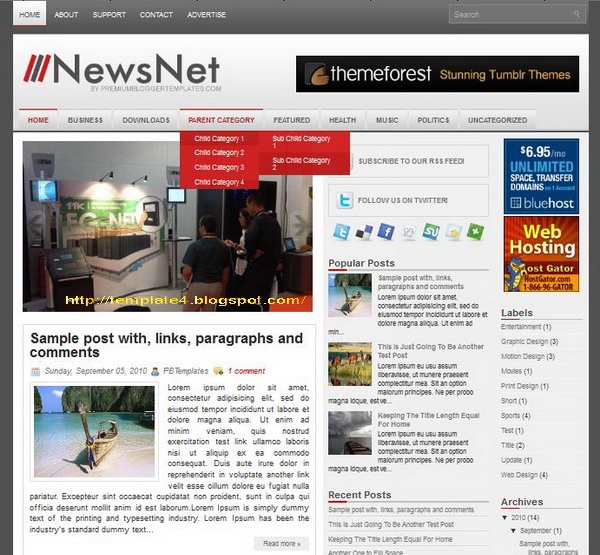
| Name: | NewsNet |
|
| Platform: | Blogger / Blogspot |
|
| Coder/Designer: | Lasantha Bandara / New WP Themes |
|
| Coder/Designer URL: | http://www.premiumbloggertemplates.com/ , http://newwpthemes.com/ |
|
| Description: | NewsNet is a free Blogger template that is an adaptation of the Wordpress, |
| it's a magazine news style with 2 sidebar, 3 column layout, grey, red and white color background, featured section, fixed width, header banner ads ready, right sidebar, slider, Twitter ready, top navigation bar and Web 2.0. |
|
| Theme Features: | - |
| |
|
| Instructions: | Configure Featured Content Slider: |
| | Login to your blogger dashboard--> layout- -> Edit HTML. Find <!-- Featured Content Slider Started -->. Now scroll down slowly and you can see each featured slider codes between <div class='imageElement'> and </div>.
Now replace,
"This is featured post X title" with your featured post title.
"SLIDER-X-URL-HERE" with your featured post URL.
Slider description with your slider description. Slider image address with your slider image. For each featured slider.
Add a Header Logo:
You can add a header logo for this template easily in the "Page Elements" section (Blogger Default Method). Logo image size must be 335px width and 66px height. |
|
| Compatible: | |
|
| Tags: | 2 sidebar, 3 column, Adapted from Wordpress, Ads Ready, Blogger, Featured Section, Fixed Width, Grey, News, Magazine, Page Navigation, red, Right Sidebar, Slider, Social Bookmark, Twitter Ready, Web 2.0, White, Widget Ready |
 Posted in
1 Sidebar
,
2 Column
,
4 Column
,
Adapted from Wordpress
,
Blogger
,
brown
,
Fixed Width
,
Gallery
,
Pink
,
red
,
Right Sidebar
,
White
|
 Thursday, October 13, 2011|
 Unknown


