Home » Posts filed under Grey
Exalted Blogger Template
 Posted in
1 Sidebar
,
2 Column
,
3 column footer
,
Ads Ready
,
Blogger
,
Elegant
,
Featured Section
,
Grey
,
Magazine
,
orange
,
Premium
,
Right Sidebar
,
Slider
,
Social Bookmark
,
Tabber
,
Twitter Ready
,
Web 2.0
,
White
,
Widget Ready
|
 Monday, September 19, 2011|
 Unknown

| Name: | Exalted |
| Platform: | Blogger / Blogspot |
| Coder/Designer: | Lasantha Bandara / Free WordPress Themes |
| Coder/Designer URL: | http://www.premiumbloggertemplates.com/ , http://fthemes.com/ |
| Description: | Exalted is a free Blogger template that is an adaptation of the Wordpress, |
| it's a premium elegant magazine style with 1 sidebar, 2 column, 3 column footer, orange, grey and white color background, featured section, fixed width, header ads banner, right sidebar, slider, social bookmark, Twitter ready, tabbed widget, top navigation bar and Web 2.0. | |
| Theme Features: | - |
| Instructions: | Configure Featured Content Slider: |
| Login to your blogger dashboard--> layout- -> Edit HTML. Find <!-- Featured Content Slider Started -->. Now scroll down slowly and you can see each featured slider codes between <div class='fp-post'> and </div>. Now replace, "This is default featured post X title" with your featured post title. "featured-post-X-url-here" with your featured post URL. Slider description with your slider description. Slider image address with your slider image. For each featured slider. Configure Second Navigation Menu Find <div class='menu-secondary-wrap'> inside your template. You can see like this code (partly): Change the name "Business, Internet, Market" and so on if you want. Replace "#" mark with the URL you want to go when click on the name Note : You do not need to change "Home" URL, because it is automatically linked to your homepage. Change Tab Names of Tab Widget: If you want to change your tab names of your tab widget then find this: Now change the names "Populars", "Tags" and "Blog Archives" as you like. Add a Header Logo: You can add a header logo for this template easily in the "Page Elements" section (Blogger Default Method). Logo image size must be 334px width and 58px height. | |
| Compatible: |      |
| Tags: | 1 Sidebar, 2 Column, 3 column footer, Adapted from Wordpress, Ads Ready, Blogger, Elegant, Featured Section, Fixed Width, Grey, Magazine, orange, Premium, Right Sidebar, Slider, Social Bookmark, Tabber, Twitter Ready, Web 2.0, White, Widget Ready |
FBTMaG V1 Blogger Template
Posted in
2 sidebar
,
3 column
,
3 column footer
,
adsense ready
,
Blogger
,
Featured Section
,
Fixed Width
,
Grey
,
Left Sidebar
,
Magazine
,
Premium
,
Right Sidebar
,
Slider
,
White
|
Tuesday, September 13, 2011|
Unknown

| Name: | FBTMaG V1 |
| Platform: | Blogger / Blogspot |
| Coder/Designer: | Free Blogger Template |
| Coder/Designer URL: | http://www.freebloggertemplate.info/ |
| Description: | FBTMaG V1 is a free Premium Blogger template that is magazine style |
| blogger template with fast loading pages and suitable for all type of blogs, with left and right sidebar, 3 column layout, 3 column footer, adsense ready, grey and white color background, featured section slider, fixed width, header banner ads, summary post and more. | |
| Theme Features: | - Dropdown Menu Navigation |
| - Automatic Slide Content - Automatic Read More - Different Style for Author Comments - Reply Comments | |
| Instructions: | FBTMaG V1 Installations Guide |
| Compatible: | |
| Tags: | 2 sidebar, 3 column, 3 column footer, adsense ready, Blogger, Featured Section, Fixed Width, Grey, Left Sidebar, Magazine, Premium, Right Sidebar, Slider, White |
Xanadu Blogger Template
Posted in
1 Sidebar
,
2 Column
,
Adapted from Wordpress
,
Ads Ready
,
Blogger
,
Featured Section
,
Fixed Width
,
Grey
,
Left Sidebar
,
Magazine
,
Slider
,
Twitter Ready
,
White
|
Monday, September 12, 2011|
Unknown

| Name: | Xanadu |
| Platform: | Blogger / Blogspot |
| Coder/Designer: | Avinas Bhardwaj |
| Coder/Designer URL: | http://besttheme.net/ |
| Description: | Xanadu is a free Blogger templates a nicely crafted theme with advance |
| features like great design like home page, single page, Page and footer widgets with social link, advertisement banner, top menu, slider widget, author updates etc. | |
| Theme Features: | - |
| Instructions: | All instruction in instruction file. |
| Compatible: | |
| Tags: | 1 Sidebar, 2 Column, Adapted from Wordpress, Ads Ready, Blogger, Featured Section, Fixed Width, Grey, Left Sidebar, Magazine, Slider, Twitter Ready, White |
TechNet Blogger Template
Posted in
2 sidebar
,
3 column
,
3 column footer
,
Ads Ready
,
Blogger
,
Blue
,
Elegant
,
Featured Section
,
Grey
,
Magazine
,
Page Navigation
,
Premium
,
Right Sidebar
,
Slider
,
Social Bookmark
,
Tabber
,
Twitter Ready
,
White
,
Widget Ready
|
|
Unknown

| Name: | TechNet |
| Platform: | Blogger / Blogspot |
| Coder/Designer: | Lasantha Bandara / Free WordPress Themes |
| Coder/Designer URL: | http://www.premiumbloggertemplates.com/ , http://fthemes.com/ |
| Description: | TechNet is a free Blogger template that is an adaptation of the Wordpress, |
| it's a premium elegant magazine style with 2 sidebar, 3 column, 3 column footer, black, blue, grey and white color background, featured section, fixed width, header ads banner, page navigation, right sidebar, slider, social bookmark, twitter ready, tabbed widget, top navigation bar and Web 2.0. | |
| Theme Features: | - |
| Instructions: | Configure Featured Content Slider: |
| Login to your blogger dashboard--> layout- -> Edit HTML. Find <!-- Featured Content Slider Started -->. Now scroll down slowly and you can see each featured slider codes between <div class='fp-post'> and </div>. Now replace, "This is default featured post X title" with your featured post title. "featured-post-X-url-here" with your featured post URL. Slider description with your slider description. Slider image address with your slider image. For each featured slider. Configure Second Navigation Menu Find <div class='menu-secondary-wrap'> inside your template. You can see like this code (partly): Change the name "Business, Internet, Market" and so on if you want. Replace "#" mark with the URL you want to go when click on the name Note : You do not need to change "Home" URL, because it is automatically linked to your homepage. Change Tab Names of Tab Widget: If you want to change your tab names of your tab widget then find this: Now change the names "Populars", "Tags" and "Blog Archives" as you like. Add a Header Logo: You can add a header logo for this template easily in the "Page Elements" section (Blogger Default Method). Logo image size must be 359px width and 62px height. | |
| Compatible: | |
| Tags: | 2 Sidebar, 3 Column, 3 column footer, Adapted from Wordpress, Ads Ready, Blue, Blogger, Elegant, Featured Section, Fixed Width, Grey, Magazine, Page Navigation, Premium, Right Sidebar, Slider, Social Bookmark, Tabber, Twitter Ready, Web 2.0, White, Widget Ready |
Emboss Blogger Template
Posted in
1 Sidebar
,
2 Column
,
3 column footer
,
Ads Ready
,
black
,
Blogger
,
Elegant
,
Featured Section
,
Grey
,
Magazine
,
Page Navigation
,
Premium
,
Right Sidebar
,
Slider
,
Social Bookmark
,
Tabber
,
Twitter Ready
,
White
,
Widget Ready
|
Saturday, September 10, 2011|
Unknown

| Name: | Emboss |
| Platform: | Blogger / Blogspot |
| Coder/Designer: | Lasantha Bandara / Free WordPress Themes |
| Coder/Designer URL: | http://www.premiumbloggertemplates.com/ , http://fthemes.com/ |
| Description: | Emboss is a free Blogger template that is an adaptation of the Wordpress, |
| it's a premium elegant magazine style with 1 sidebar, 2 column, 3 column footer, black, grey and white color background, featured section, fixed width, header ads banner, page navigation, right sidebar, slider, social bookmark, twitter ready, tabbed widget, top navigation bar and Web 2.0. | |
| Theme Features: | - |
| Instructions: | Configure Featured Content Slider: |
| Login to your blogger dashboard--> layout- -> Edit HTML. Find <!-- Featured Content Slider Started -->. Now scroll down slowly and you can see each featured slider codes between <div class='fp-post'> and </div>. Now replace, "This is default featured post X title" with your featured post title. "featured-post-X-url-here" with your featured post URL. Slider description with your slider description. Slider image address with your slider image. For each featured slider. Configure Second Navigation Menu Find <div class='menu-secondary-wrap'> inside your template. You can see like this code (partly): Change the name "Business, Internet, Market" and so on if you want. Replace "#" mark with the URL you want to go when click on the name Note : You do not need to change "Home" URL, because it is automatically linked to your homepage. Change Tab Names of Tab Widget: If you want to change your tab names of your tab widget then find this: Now change the names "Populars", "Tags" and "Blog Archives" as you like. Add a Header Logo: You can add a header logo for this template easily in the "Page Elements" section (Blogger Default Method). Logo image size must be 335px width and 70px height. | |
| Compatible: | |
| Tags: | 1 Sidebar, 2 Column, 3 column footer, Adapted from Wordpress, Ads Ready, black, Blogger, Elegant, Featured Section, Fixed Width, Grey, Magazine, Page Navigation, Premium, Right Sidebar, Slider, Social Bookmark, Tabber, Twitter Ready, Web 2.0, White, Widget Ready |
NewsNet Blogger Template
Posted in
2 sidebar
,
3 column
,
Adapted from Wordpress
,
Ads Ready
,
Blogger
,
Featured Section
,
Grey
,
Magazine
,
News
,
Page Navigation
,
red
,
Right Sidebar
,
Slider
,
Social Bookmark
,
Twitter Ready
,
White
,
Widget Ready
|
Thursday, September 8, 2011|
Unknown
| Name: | NewsNet |
| Platform: | Blogger / Blogspot |
| Coder/Designer: | Lasantha Bandara / New WP Themes |
| Coder/Designer URL: | http://www.premiumbloggertemplates.com/ , http://newwpthemes.com/ |
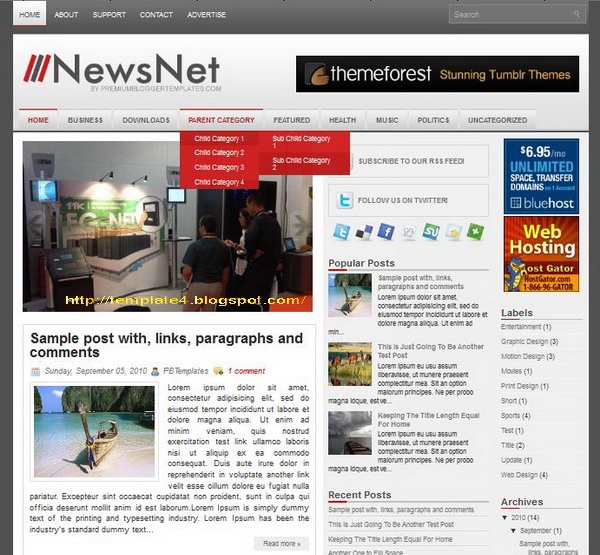
| Description: | NewsNet is a free Blogger template that is an adaptation of the Wordpress, |
| it's a magazine news style with 2 sidebar, 3 column layout, grey, red and white color background, featured section, fixed width, header banner ads ready, right sidebar, slider, Twitter ready, top navigation bar and Web 2.0. | |
| Theme Features: | - |
| Instructions: | Configure Featured Content Slider: |
| Login to your blogger dashboard--> layout- -> Edit HTML. Find <!-- Featured Content Slider Started -->. Now scroll down slowly and you can see each featured slider codes between <div class='imageElement'> and </div>. Now replace, "This is featured post X title" with your featured post title. "SLIDER-X-URL-HERE" with your featured post URL. Slider description with your slider description. Slider image address with your slider image. For each featured slider. Add a Header Logo: You can add a header logo for this template easily in the "Page Elements" section (Blogger Default Method). Logo image size must be 335px width and 66px height. | |
| Compatible: | |
| Tags: | 2 sidebar, 3 column, Adapted from Wordpress, Ads Ready, Blogger, Featured Section, Fixed Width, Grey, News, Magazine, Page Navigation, red, Right Sidebar, Slider, Social Bookmark, Twitter Ready, Web 2.0, White, Widget Ready |
Essenty Blogger Template
Posted in
2 sidebar
,
3 column
,
Adapted from Wordpress
,
Ads Ready
,
black
,
Blogger
,
Elegant
,
Featured Section
,
Grey
,
Left Sidebar
,
Magazine
,
Page Navigation
,
Right Sidebar
,
Slider
,
Twitter Ready
,
White
,
Widget Ready
|
|
Unknown
| Name: | Essenty |
| Platform: | Blogger / Blogspot |
| Coder/Designer: | Lasantha Bandara / New WP Themes |
| Coder/Designer URL: | http://www.premiumbloggertemplates.com/ , http://newwpthemes.com/ |
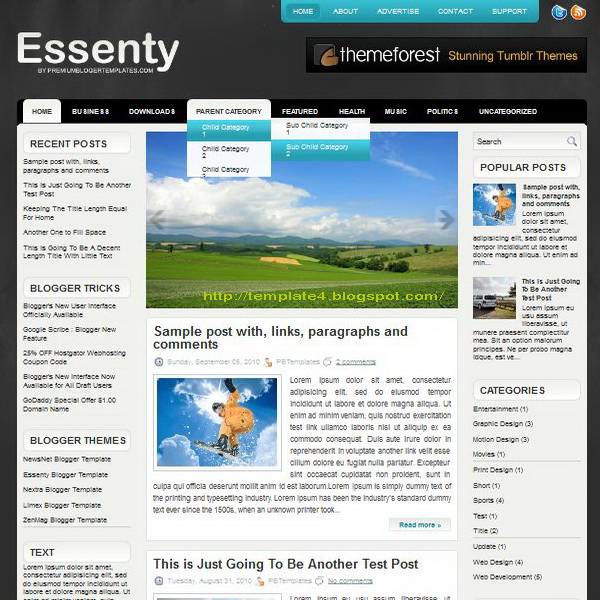
| Description: | Essenty is a free Blogger template that is an adaptation of the Wordpress, |
| it's a elegant magazine style with 2 sidebar, 3 column layout, black, grey and white color background, featured section, fixed width, header banner ads ready, left sidebar, right sidebar, rounded corners, slider, Twitter ready, top navigation bar and Web 2.0. | |
| Theme Features: | - |
| Instructions: | Configure Featured Content Slider: |
| Login to your blogger dashboard--> layout- -> Edit HTML. Find <!-- Featured Content Slider Started -->. Now scroll down slowly and you can see each featured slider codes between <div class='imageElement'> and </div>. Now replace, "This is featured post X title" with your featured post title. "SLIDER-X-URL-HERE" with your featured post URL. Slider description with your slider description. Slider image address with your slider image. For each featured slider. Add a Header Logo: You can add a header logo for this template easily in the "Page Elements" section (Blogger Default Method). Logo image size must be 271px width and 70px height. | |
| Compatible: | |
| Tags: | 2 sidebar, 3 column, Adapted from Wordpress, Ads Ready, black, Blogger, Elegant, Featured Section, Fixed Width, Grey, Left Sidebar, Magazine, Page Navigation, Right Sidebar, Slider, Twitter Ready, Web 2.0, White, Widget Ready |
Limex Blogger Template
Posted in
2 sidebar
,
3 column
,
3 column footer
,
Ads Ready
,
Blogger
,
Elegant
,
Featured Section
,
Grey
,
Magazine
,
orange
,
Page Navigation
,
Premium
,
Right Sidebar
,
Slider
,
Social Bookmark
,
Tabber
,
Twitter Ready
,
White
,
Widget Ready
|
|
Unknown

| Name: | Limex |
| Platform: | Blogger / Blogspot |
| Coder/Designer: | Lasantha Bandara / Free WordPress Themes |
| Coder/Designer URL: | http://www.premiumbloggertemplates.com/ , http://fthemes.com/ |
| Description: | Limex is a free Blogger template that is an adaptation of the Wordpress, |
| it's a premium elegant magazine style with 2 sidebar, 3 column, 3 column footer, grey, orange and white color background, featured section, fixed width, header ads banner, page navigation, right sidebar, slider, social bookmark, twitter ready, tabbed widget, top navigation bar and Web 2.0. | |
| Theme Features: | - |
| Instructions: | Configure Featured Content Slider: |
| Login to your blogger dashboard--> layout- -> Edit HTML. Find <!-- Featured Content Slider Started -->. Now scroll down slowly and you can see each featured slider codes between <div class='fp-post'> and </div>. Now replace, "This is default featured post X title" with your featured post title. "featured-post-X-url-here" with your featured post URL. Slider description with your slider description. Slider image address with your slider image. For each featured slider. Configure Second Navigation Menu Find <div class='menu-secondary-wrap'> inside your template. You can see like this code (partly): Change the name "Business, Internet, Market" and so on if you want. Replace "#" mark with the URL you want to go when click on the name Note : You do not need to change "Home" URL, because it is automatically linked to your homepage. Change Tab Names of Tab Widget: If you want to change your tab names of your tab widget then find this: Now change the names "Populars", "Tags" and "Blog Archives" as you like. Add a Header Logo: You can add a header logo for this template easily in the "Page Elements" section (Blogger Default Method). Logo image size must be 294px width and 56px height. | |
| Compatible: | |
| Tags: | 2 sidebar, 3 column, 3 column footer, Adapted from Wordpress, Ads Ready, Blogger, Elegant, Featured Section, Fixed Width, Grey, Magazine, orange, Page Navigation, Premium, Right Sidebar, Slider, Social Bookmark, Tabber, Twitter Ready, Web 2.0, White, Widget Ready |


Sponsors

Popular Posts
-
 Homepage Blogpage Postpage Name: Wallbase Platform: Blogger / Blogspot Coder/Designer: Avinas Bhardwaj, Web 2 Feel Code...
-
 Name: Jukebox Platform: Blogger / Blogspot Coder/Designer: Lasantha Bandara / New WP Themes Coder/Designer URL: http://www.premi...
-
 Name: Perpetum Magazine Platform: Blogger / Blogspot Coder/Designer: Harish, SimpleWP Themes Coder/Designer URL: http://www.cust...
-
 Name: iFashion Platform: Blogger / Blogspot Coder/Designer: Lasantha Bandara / New WP Themes Coder/Designer URL: http://www.prem...
-
 Name: Vias Platform: Blogger / Blogspot Coder/Designer: Lasantha Bandara / New WP Themes Coder/Designer URL: http://www.premiumb...
Recent Stories
Twitter Updates
Recent Comments
Archives
Categories
Blog Archives
Followers
Tag Cloud
1 Sidebar
2 Column
2 sidebar
3 column
3 column footer
4 Column
4 Column Footer
Adapted from Wordpress
Ads Ready
adsense ready
black
Blogger
Blue
brown
dark
Elegant
Featured Section
Fixed Width
Gallery
Grey
Left Sidebar
Magazine
News
orange
Page Navigation
Pink
Portfolio
Premium
red
Right Sidebar
SEO Optimized
Slider
Social Bookmark
Tabber
Twitter Ready
Web 2.0
White
Widget Ready
Yellow